Diet Planner Project in Java using JSP and Servlet is a web-based application designed to help users create and manage their diet plans and daily routines. This project is suitable for 2nd-year, 3rd-year, and final-year IT and Computer Science students for their college projects.
The project is available with free source code, making it useful for students who want to understand and develop a Java web application using JSP, Servlet, MySQL, JDBC, Bootstrap, and MVC architecture.
Diet Planner System Project in Java
The Diet Planner System is a multi-role application with two main roles: Admin and User. The Admin has primary control over the system and is responsible for managing users and different features of the application.
Users can register and log in to the system, create diet plans, set fitness goals, maintain daily routines, and track their food intake and calorie information.
The complete project is developed using Java Servlet and JSP. HTML, CSS, JavaScript, and Bootstrap are used for the front end. JDBC API is used for database connectivity, while MySQL is used as the database. The project follows the MVC (Model View Controller) design pattern.
Free Source Code of Diet Planner Project
The Diet Planner Project is available with free source code. Students can use the source code to learn how JSP, Servlet, JDBC, MySQL, and MVC architecture are used to build a Java web application.
Get the Free Project Source Code:
https://github.com/jcodebun/Diet-Planner-Project-in-java.git
Diet Planner System Project Abstract
Planning a diet and maintaining a daily routine can help users organize their food intake and fitness activities. A diet planner provides a convenient way to maintain diet-related information in one place.
Codebun has developed this Diet Planner Project in Java using JSP and Servlet with two main roles: Admin and User. The Admin is the primary user and can manage users and different features of the system.
Users can register and access the Diet Planner after logging in. They can create diet plans, set fitness goals, enter information about their activities and food consumption, and track their food intake and calorie count.
The system allows users to maintain their daily diet plans and routines in an organized way.
Objectives of Diet Planner System
- To provide an easy-to-use and reliable Diet Planner System.
- To develop a secure and robust application for managing diet plans and user information.
- To allow users to create and maintain their daily diet routines.
- To help users record their food intake, activities, and calorie information.
- To maintain user records efficiently.
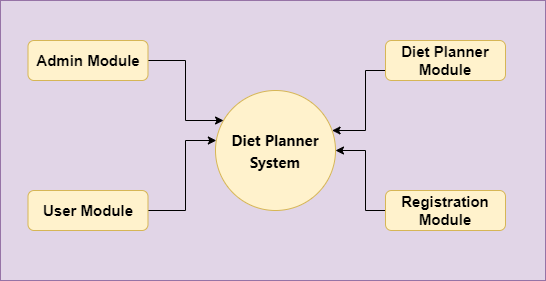
Modules in Diet Planner System
Admin Module
The Admin Module allows the administrator to log in to the system and manage the overall application. Admin can manage users and maintain different features of the system.
User Module
The User Module manages user-related operations. Users can register using their basic information, log in to the system, and manage their profiles.
Users can access the Diet Planner and maintain their diet plans and daily routines.
Diet Planner Module
The Diet Planner Module allows users to create and manage their diet plans. Users can set fitness goals and enter information about their activities and food consumption.
Users can also track their food intake and calorie count and maintain their daily diet routines.
Registration Module
The Registration Module manages user registration-related operations. Users can register on the system and use their login credentials to access the application.
User Roles of Diet Planner System
There are two main roles in the Diet Planner System:
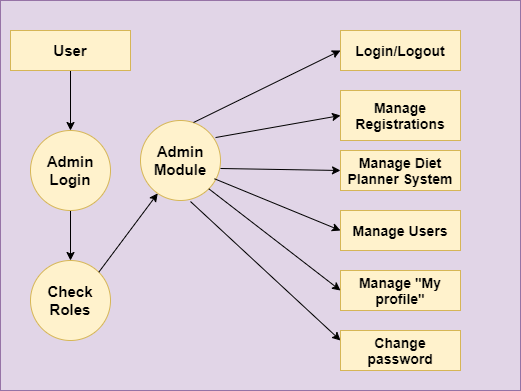
1) Admin
- Admin can log in and log out of the system.
- Admin can manage the overall system.
- Admin can manage users and their details.
- Admin can add, remove, and update different features.
- Admin can change the password.
- Admin can manage the My Profile section.
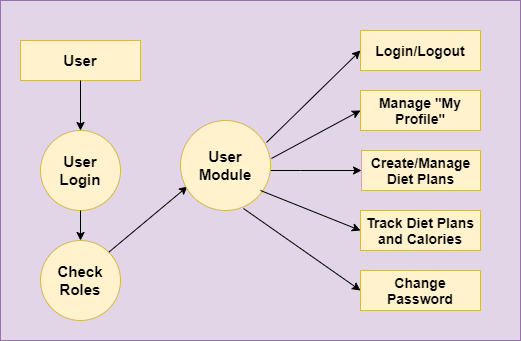
2) User
- Users can register and log in to the system.
- Users can log in and log out of the system.
- Users can create and maintain diet plans.
- Users can set fitness goals.
- Users can track food intake and calories.
- Users can maintain their daily diet routines.
- Users can change their passwords.
- Users can manage the My Profile section.
Flow Diagram of Diet Planner System
The following diagrams represent the data flow and system processes of the Diet Planner System.

Tools and Technologies Used
- Technology/Domain: Java
- Front End: JSP, HTML, CSS, JavaScript, Bootstrap
- Server Side: Servlet
- Database: MySQL
- Database Connectivity: JDBC
- Server: Apache Tomcat 8.5
- Architecture: MVC (Model View Controller)
Java Web Project Configuration
To run this Java web project successfully, follow the Java Web Project Configuration Tutorial:
https://codebun.com/java-web-project-configuration/
This tutorial explains the configuration required to run Java web applications using JSP, Servlet, MySQL, and Tomcat.
Free Project Source Code
The complete Diet Planner Project source code is available for free. Students can use the source code as a learning reference and understand how different components of a Java web application work together.
Get Free Source Code:
https://github.com/jcodebun/Diet-Planner-Project-in-java.git
Diet Planner Project Video
Watch the project demonstration to understand the functionality of the Diet Planner System:
Conclusion
The Diet Planner Project in Java using JSP and Servlet is a web-based application that allows users to create and maintain diet plans, set fitness goals, and track food intake and calorie information.
The project is suitable for 2nd-year, 3rd-year, and final-year IT and Computer Science students looking for a Java web application project for their college projects. It also provides practical experience with JSP, Servlet, JDBC, MySQL, Bootstrap, and MVC architecture.
The complete project source code is available for free, making it useful for students who want to study the project structure and use it as a reference for their Java web development projects.
