Bike Rental System in Java using JSP and Servlet is a web-based application developed to computerize and simplify the management process of a bike rental store. The system allows users to search for available bikes, rent a bike, make advance bookings, and manage their rental activities online.
This project is suitable for 2nd-year, 3rd-year, and final-year IT and Computer Science students for their college minor or major projects. The complete project is available with free source code and can be used for learning and academic purposes.
Bike Rental System Overview
Bike Rental System is a multi-role Java web application with two main roles: Admin and User. The Admin has primary control over the system and is responsible for managing bikes, bike categories, bookings, payments, and other store-related information.
Admin can add, update, view, and delete bike information, manage bike categories, check bike availability, manage bookings, and monitor payments made by users.
Users can register themselves on the portal and log in using their credentials. After logging in, users can search for bikes based on categories, check bike availability, rent a bike, make advance bookings, and make payments online.
The complete project is developed using JSP and Servlet. HTML, CSS, JavaScript, and Bootstrap are used for the front end. JDBC is used for database connectivity, while MySQL is used as the database. The project follows the MVC (Model View Controller) design pattern.
Free Source Code of Bike Rental System
The complete Bike Rental System project source code is available for free. Students can download the source code and use it to understand how a Java web application for bike booking and rental management can be developed using JSP, Servlet, JDBC, and MySQL.
Free Project Source Code:
https://github.com/jcodebun/Bike-Booking-Project.git
Bike Rental System Abstract
Renting a bike is a convenient option for people who do not own a bike or need a two-wheeler for a short period. A digital bike rental system can reduce the time and effort required to search for available bikes and complete the rental process.
Bike Rental System is designed to digitalize the process of renting bikes. The system consists of different components such as Admin, Users, Bike Categories, Bikes, Availability, Bookings, and Payments.
In this Java project, Admin is the primary user who manages the overall system. Admin can add, update, and delete bike information, manage bike categories, check bike availability, manage bookings, and monitor payments.
Users can register on the portal and log in to the system. After login, they can view available bikes, search for bikes from a particular category, check availability, rent a bike, make advance bookings, and make payments online.
The major objectives of the Bike Rental System are:
- To provide a simple and user-friendly bike rental management system.
- To develop a secure and reliable Bike Rental System.
- To allow users to search and rent bikes online.
- To maintain records of bikes, users, bookings, rentals, and payments.
- To allow Admin to manage bike availability and rental-related information.
- To reduce the manual effort involved in managing a bike rental store.
Modules of Bike Rental System
Admin Module
The Admin Module provides access to the overall system. Admin can manage bikes, categories, bookings, payments, and other important information.
Admin can:
- Add new bikes.
- Update bike information.
- View available and existing bikes.
- Delete bikes that are no longer available.
- Manage bike categories.
- View and manage user details.
- View, confirm, or cancel bike bookings.
- Check payments made by users.
- Manage bike rental charges.
- Manage profile and password details.
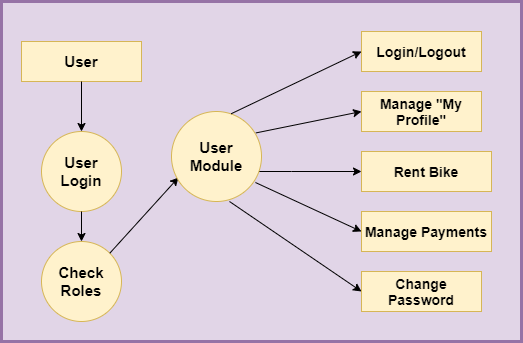
User Module
The User Module allows customers to register and access the bike rental system.
Users can:
- Register on the portal.
- Log in and log out of the system.
- Manage their profile.
- Search for bikes.
- View bikes from specific categories.
- Check bike availability.
- Rent bikes.
- Make advance bookings.
- Make payments online.
- Change their password.
Category Module
The Category Module allows Admin to organize bikes into different categories. Admin can manage category-related information based on factors such as bike brand, model, charges per hour, and other details.
This makes it easier for users to search for bikes according to their requirements.
Bike Module
The Bike Module manages all information related to bikes available in the rental store.
Admin can add new bikes, update existing bike details, view bike information, and delete bikes that are no longer available for rent.
Bike information can include:
- Bike company or brand
- Bike model
- Color
- Weight
- Height
- Charges per hour
- Other bike-related details
Availability Module
The Availability Module allows Admin to check whether a particular bike is available for rent.
Users can also check available bikes before making a booking. This helps in managing bike bookings and avoiding conflicts between rentals.
Rent and Booking Module
The Rent and Booking Module manages operations related to renting bikes.
Users can select a bike according to their requirements and make a rental booking. The system also allows users to make advance bookings for renting a bike.
Admin can view, confirm, or cancel bookings made by users.
Payment Module
The Payment Module manages payment-related operations. Users can make payments for their bike rentals, while Admin can view and manage payment information.
Demo of Bike Rental System
You can watch the project demo to understand how the Bike Rental System and its Admin and User modules.
Users Roles
Two types of users can interact with the Bike Rental System:
- Admin
- User
Admin
The Admin can:
- Log in and log out of the system.
- Add, view, edit, and delete bikes.
- Add, view, edit, and delete bike categories.
- View, confirm, and cancel bike bookings.
- Check payments made by users.
- Manage bike rental charges.
- Manage user details.
- Change the password.
- Manage the Admin profile.
User
The User can:
- Register on the portal.
- Log in and log out of the system.
- Manage their profile.
- Search for bikes by category.
- View available bikes.
- Rent bikes.
- Make advance bookings.
- Make payments online.
- Change the password.
Flow Diagram of Bike Rental System
Level 0 DFD

Level 1 DFD

Level 2 DFD

Additional Level 2 DFD
Tools and Technologies Used
Technology/Domain: Java
Front-End: JSP, HTML, CSS, JavaScript, Bootstrap
Server-side: Servlet
Database: MySQL
Database Connectivity: JDBC
Server: Apache Tomcat 8.5
Design Pattern: MVC
Java Web Project Configuration
To configure and run this Java web project on your local computer, follow the Java Web Project Configuration tutorial:
https://codebun.com/java-web-project-configuration/
Get Free Source Code
The complete Bike Rental System source code is available for free. Students can download the source code and use the project for learning, academic purposes, and college project demonstrations.
GitHub Source Code:
https://github.com/jcodebun/Bike-Booking-Project.git
Conclusion
Bike Rental System is a Java web application designed to simplify the management of a bike rental store. It provides separate Admin and User modules for managing bikes, categories, availability, bookings, rentals, and payments.
The project is developed using Java, JSP, Servlet, JDBC, MySQL, HTML, CSS, JavaScript, and Bootstrap. It is suitable for 2nd-year, 3rd-year, and final-year IT and Computer Science students looking for a Java web project with free source code.
