Wallet Management System in Java using JSP and Servlet is a web-based application developed to allow customers to manage digital wallets and make payments while purchasing products or services. The system allows users to create wallet accounts, add money, make payments, view transaction history, and manage their wallet balance.
This project is suitable for 3rd-year and final-year IT and Computer Science students for their college minor or major projects. The complete Wallet Management System is available with free source code and can be used for learning and academic purposes.
Wallet Management System Overview
Wallet Management System is a multi-role Java web application with two main roles: Admin and User. The Admin has primary control over the system and is responsible for managing users, wallet accounts, transactions, payments, and other system activities.
Admin can manage user registrations, wallet accounts, transactions, payment records, and user details. Admin can also update wallet balances, configure transaction limits, monitor transactions, and manage refunds according to the system’s functionality.
Users can register on the portal and create their digital wallet accounts. After logging in, users can add money to their wallets, make payments using their wallet balance, manage their accounts, and view transaction and refund history.
The complete project is developed using JSP and Servlet. HTML, CSS, JavaScript, and Bootstrap are used for the front end. JDBC is used for database connectivity, while MySQL is used as the database. The project follows the MVC (Model View Controller) design pattern.
Free Source Code of Wallet Management System
The complete Wallet Management System project source code is available for free. Students can download the source code and use it to understand the development of a Java web application using JSP, Servlet, JDBC, MySQL, and MVC architecture.
Free Project Source Code:
https://github.com/jcodebun/Wallet-Mangment-System.git
Wallet Management System Abstract
Digital wallets, also known as e-wallets, provide a way for users to store and use digital funds for online payments. A wallet system can act as an intermediary between users and merchants and can simplify payment management by allowing users to make transactions using their available wallet balance.
Codebun has developed this Wallet Management System in Java with two main roles: Admin and User. Admin is the primary user who manages the overall system, including user registrations, wallet accounts, transactions, payments, and user information.
Admin can add, update, and manage system information, approve or cancel wallet account registrations, and view, confirm, or cancel transactions made by users. Admin can also add, deduct, or update wallet amounts, set transaction limits, manage refunds, and maintain transaction records.
Users can register on the portal and create their digital wallet accounts. They can add money to their wallets and use the available wallet balance to make payments for purchases. Users can also manage their wallet information and view transaction and refund history.
The major objectives of the Wallet Management System are:
- To provide a simple and user-friendly digital wallet management application.
- To develop a secure and reliable Wallet Management System.
- To maintain records of users, wallets, transactions, payments, refunds, and transaction history.
- To allow users to add money to their wallets and make payments.
- To help Admin manage wallet accounts and transactions.
- To provide a centralized platform for managing wallet-related activities.
Modules in Wallet Management System
Admin Module
The Admin Module provides control over the overall Wallet Management System. Admin can manage users, wallet accounts, transactions, payments, and other system information.
Admin can:
- Log in and log out of the system.
- View, confirm, and cancel wallet account registrations.
- Manage wallet accounts.
- View, confirm, and cancel user transactions.
- Add, deduct, and update amounts in user wallets.
- Manage users and their details.
- Maintain transaction history and database records.
- Set transaction limits.
- Monitor wallet balances.
- Manage refunds according to the system functionality.
- Notify users when their wallet balance is insufficient.
- Manage the Admin profile.
- Change the password.
In case of a failed transaction where an amount has been deducted, Admin can process the refund according to the application’s refund functionality and transfer the refund amount back to the user’s wallet.
User Module
The User Module allows customers to create and manage their digital wallet accounts.
Users can:
- Register for a wallet account.
- Log in and log out of the system.
- Manage their profile.
- Manage their wallet.
- Add money to their wallet.
- Make payments using their wallet balance.
- View transaction history.
- View refund information.
- Change the password.
Wallet Module
The Wallet Module manages wallet-related operations. Admin can manage wallet accounts and update wallet balances according to the system’s functionality.
Users can view their wallet balance, add money, and use their wallet balance to make payments.
User Details Module
The User Details Module allows Admin to manage information related to registered users. Admin can view and maintain user details and manage user accounts.
User Roles
Two types of users can interact with the Wallet Management System:
- Admin
- User
Admin
The Admin can:
- Log in and log out of the system.
- Manage wallet accounts.
- View, confirm, and cancel registrations.
- View, confirm, and cancel transactions.
- Add, deduct, and update amounts in user wallets.
- Manage users and their details.
- Maintain transaction history and database records.
- Set transaction limits.
- Manage refunds.
- Manage the Admin profile.
- Change the password.
User
The User can:
- Register for a wallet account.
- Log in and log out.
- Manage their profile.
- Manage their wallet.
- Add money to their wallet.
- Make online payments using their wallet.
- View transaction history.
- View refund information.
- Change the password.
Demo of Wallet Management System
You can watch the project demo to understand the working of the Wallet Management System and its Admin and User modules.
Flow Diagram of Wallet Management System
Level 0 DFD
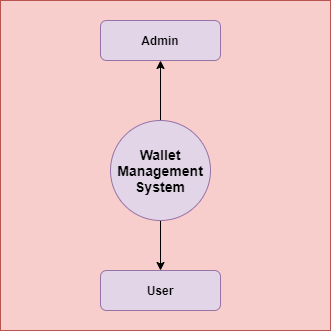
Level 1 DFD

Level 2 DFD

Additional Level 2 DFD

Tools and Technologies Used
Technology/Domain: Java
Front-End: JSP, HTML, CSS, JavaScript, Bootstrap
Server-side: Servlet
Database: MySQL
Database Connectivity: JDBC
Server: Apache Tomcat 8.5
Design Pattern: MVC
Java Web Project Configuration
To configure and run this Java web project on your local computer, follow the Java Web Project Configuration tutorial:
https://codebun.com/java-web-project-configuration/
Get Free Source Code
The complete Wallet Management System source code is available for free. Students can download the project source code and use it for learning, academic purposes, and college project demonstrations.
GitHub Source Code:
https://github.com/jcodebun/Wallet-Mangment-System.git
Conclusion
Wallet Management System is a Java web application designed to simplify the management of digital wallets and online payments. It provides separate Admin and User modules for managing wallet accounts, balances, transactions, payments, refunds, and user information.
The project is developed using Java, JSP, Servlet, JDBC, MySQL, HTML, CSS, JavaScript, and Bootstrap. It is suitable for 3rd-year and final-year IT and Computer Science students looking for a Java web project with free source code.
