Online Sports Shop Project in Java with source code and project report is an e-commerce web application developed using JSP, Servlet, MySQL, and Java. The project provides an online platform where customers can browse sports products, search and filter products, add products to their shopping cart, and place orders online.
The Online Sports Shop project is suitable as a minor or major Java project for Computer Science, BCA, and MCA students. It includes source code, database, project report, and configuration support, making it useful for students who want to understand how an e-commerce web application is developed using Java web technologies.
The project follows an MVC-based structure, with JSP, HTML, CSS, JavaScript, and Bootstrap used for the frontend, Servlet used to handle server-side requests and responses, and MySQL used for database management.
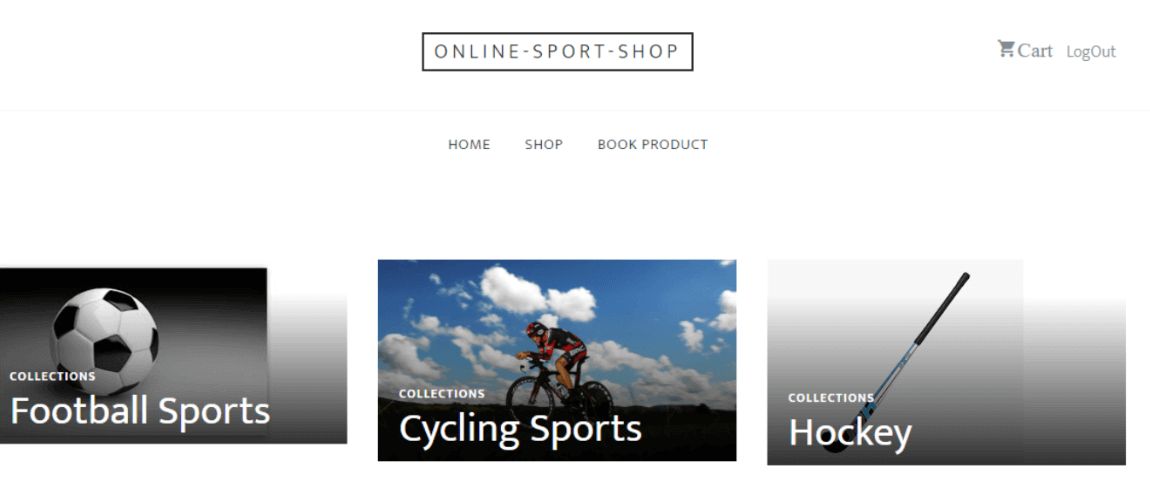
Online Sports Shop Project in Java
The Online Sports Shop is an e-commerce-based web application where users can browse sports-related products and purchase products online.
The application provides different modules for Admin, Shop Owner, and Customer. Shop owners can manage sports products, while Admin can manage shop owners, customers, and products. Customers can browse products, search and filter products, add products to the cart, and proceed through the online purchase process.
The project also includes common e-commerce functionality such as product management, shopping cart, order history, and a dummy payment page.
Since this is an academic project, the payment functionality uses a dummy payment page developed using JSP and Servlet. It is not connected to a real-time payment gateway.
Objectives of Online Sports Shop
The major objectives of the Online Sports Shop Project are:
- To provide an online platform for buying sports products.
- To allow customers to browse different sports products.
- To provide product search and filtering functionality.
- To allow users to add and remove products from the shopping cart.
- To provide a convenient online shopping experience.
- To allow Admin and Shop Owners to manage products.
- To maintain customer and order information.
- To demonstrate e-commerce functionality using Java web technologies.
- To provide students with a practical Java-based e-commerce project.
How the Online Sports Shop Works
The Online Sports Shop has three main actors:
- Admin
- Shop Owner
- Customer
The basic workflow of the application is:
- A user registers on the application by providing common details such as contact number, email ID, and password.
- The registered user logs into the application.
- Customers can browse the available sports products.
- Customers can search for products and filter them according to category or product type.
- Customers can add products to the shopping cart.
- Customers can remove products or review the products added to the cart.
- The customer can check the product prices and available discounts.
- The customer proceeds to the dummy payment page to complete the academic purchase process.
- Shop Owners can add and manage products according to categories.
- The Admin manages Shop Owners, customers, and products.
Modules in Online Sports Shop
The main modules of the Online Sports Shop project are:
- Login and Registration
- Product Management
- Payment
- Shopping Cart
- About Us and Contact Us
- Admin Management
- Shop Owner Management
- Customer Management
Login and Registration
The Login and Registration module provides account access for Admin, Shop Owners, and Customers.
Users can register by providing details such as:
- Contact number
- Email ID
- Password
After registration, users can log in to the application using their account credentials.
Customers can access their shopping-related information, including their cart and order history.
Shop Owners can log in and manage sports products.
The Admin can manage Shop Owners, end users, and product information.
Admin Module
The Admin has control over the major management activities of the application.
Admin functionalities include:
- Manage Shop Owners.
- Manage customers/end users.
- Add products.
- View products.
- Edit product information.
- Delete products.
- Update product records.
The Admin can maintain the product information available in the online sports store.
Shop Owner Module
The Shop Owner can manage the products available in the store.
Shop Owner functionalities include:
- Log in to the application.
- Add sports products.
- Manage products according to categories.
- Edit product information.
- Delete products.
- Update product records.
This module allows the Shop Owner to maintain the sports product catalog.
Customer Module
Customers can use the application to browse and purchase sports products.
Customer functionalities include:
- Register an account.
- Log in to the application.
- View sports products.
- Search for products.
- Filter products.
- Browse products by category.
- Browse products by product type.
- Add products to the shopping cart.
- Remove products from the shopping cart.
- View products added to the cart.
- Check product prices and discounts.
- Proceed to the payment section.
- View booking/order history.
Product Management
Products are one of the main components of the Online Sports Shop.
Admin and Shop Owners can add, edit, update, and delete product information.
Customers can explore the available products according to their requirements.
The application also provides search and filtering functionality, allowing customers to find products more easily.
Customers can filter products according to:
- Product category
- Product type
Customers can also search for specific products.
Shopping Cart
The shopping cart works like an online shopping bag or trolley.
Customers can add products they are interested in to the cart and review the selected products before completing the purchase.
Customers can:
- Add products to the cart.
- Remove products from the cart.
- View products in the cart.
- Check individual product prices.
- Check applicable discounts.
- View the combined price of products added to the cart.
The cart allows customers to select multiple products and proceed with the purchase process.
Payment Module
The Online Sports Shop includes a payment module for demonstrating the online purchasing process.
Since this is an academic project, the application uses a dummy payment page developed using JSP and Servlet. It is not a real-time payment gateway.
The payment module helps students understand the basic flow of an online shopping application without connecting the project to an actual payment service.
Order and Booking History
After logging into the application, customers can check their previous booking or order-related information.
The system maintains shopping-related records so that users can refer to their previous orders.
Admin can also manage and view relevant product and user information.
About Us and Contact Us
The application includes static About Us and Contact Us pages.
The About Us page provides information about the organization or online sports store.
The Contact Us page provides users with information for contacting the Admin or organization.
CRUD Operations
The Online Sports Shop supports CRUD operations for product management.
CRUD stands for:
- Create – Add new products.
- Read – View product information.
- Update – Edit or update product details.
- Delete – Remove products from the system.
These operations allow Admin and Shop Owners to maintain the online sports product catalog.
MVC Architecture
The Online Sports Shop follows an MVC-based application structure.
Model
The Model handles application data and database-related operations. MySQL is used to store product, user, and shopping-related information.
View
JSP, HTML, CSS, JavaScript, and Bootstrap are used to develop the frontend and user interface of the application.
Controller
Servlet is used to handle server-side requests and responses. It processes requests from users and controls communication between the frontend and backend.
The MVC structure helps separate different parts of the application and makes the project easier to understand and maintain.
Database Management
MySQL is used to manage the backend database of the Online Sports Shop.
The database stores information related to:
- Admin users
- Shop Owners
- Customers
- Sports products
- Product categories
- Product types
- Shopping cart information
- Orders and booking history
JDBC is used to connect the Java application with the MySQL database.
Key Features of Online Sports Shop
- E-commerce-based Java web application.
- Separate Admin, Shop Owner, and Customer modules.
- Customer registration and login.
- Product management.
- Product category management.
- Product search.
- Product filtering.
- Shopping cart.
- Add and remove cart items.
- Product price and discount information.
- Online purchase workflow.
- Dummy payment page.
- Order/booking history.
- About Us page.
- Contact Us page.
- CRUD operations.
- MySQL database integration.
- JSP and Servlet implementation.
- MVC architecture.
- Java-based web application.
Tools and Technologies Used
The Online Sports Shop is developed using Java web technologies.
Frontend: JSP, HTML, CSS, JavaScript, Bootstrap
Server-side: Servlet
Database: MySQL
Database Connectivity: JDBC
IDE: Eclipse / STS / NetBeans
Server: Apache Tomcat
Architecture: MVC
Technology Details
- HTML and CSS: Used to create and design the frontend.
- JSP: Used to create dynamic web pages and manage the View layer.
- JavaScript and Bootstrap: Used to improve the user interface and frontend functionality.
- Servlet: Used to handle server-side requests and responses.
- JDBC: Used to connect the Java application with MySQL.
- MySQL: Used to store and manage application data.
- Tomcat: Used to deploy and run the Java web application.
- Eclipse, STS, or NetBeans: Used as the development environment for writing and running the project.
Hardware and Software Requirements
Hardware Requirements
- Minimum 2 GB RAM
- Minimum 20 GB hard disk space
Software Requirements
- Operating system that supports Java/JDK, such as Windows, macOS, or Linux
- JDK 1.8
- Eclipse / STS / NetBeans
- MySQL 5.6 or above
- Apache Tomcat 8.5 or above
Project Suitability for Students
The Online Sports Shop is suitable for Computer Science, BCA, and MCA students who want to develop an e-commerce project using Java.
It can be used as a minor or major project depending on the requirements of the college or course.
Students can learn practical concepts such as:
- Java web application development
- JSP
- Servlet
- MySQL
- JDBC
- MVC architecture
- CRUD operations
- User registration and login
- Product management
- Product search and filtering
- Shopping cart functionality
- Payment workflow
- Order management
- Database-driven applications
- Apache Tomcat deployment
The project can also be useful for students preparing their project reports, demonstrations, and Java project viva.
Project Demo
Watch the Online Sports Shop Project demonstration:
Java Web Project Configuration Tutorial
To learn how to configure and run a Java web project using JSP, Servlet, MySQL, and Tomcat, check the complete Java Web Project Configuration Tutorial:
https://codebun.com/java-web-project-configuration/
Viva Questions and Answers for Java Project
Students preparing for their Java project viva can refer to:
https://codebun.com/viva-questions-and-answer-for-java-project/
Free Project Source Code and Project Report
You can get the Free Project Source Code for the Online Sports Shop from GitHub:
https://github.com/jcodebun/OnlineSportShop.git
The source code can help students understand how JSP, Servlet, JDBC, MySQL, MVC architecture, CRUD operations, product management, shopping cart, and payment workflow are implemented in a Java-based e-commerce application.
Project resources such as the database and project report can also be useful while preparing project documentation and presentations.
Check More Java Projects with Source Code
Explore more Java projects with source code:
https://codebun.com/category/complete-java-project-with-source-code/
