The Alumni Information System is a Java-based web application designed for students, colleges, and universities to maintain communication with their alumni and faculty members. The system helps bridge the communication gap between educational institutions and their former students.
The application provides a common platform where universities, alumni, and faculty members can connect, share information, participate in events, and stay updated with each other.
Alumni Information System in Java
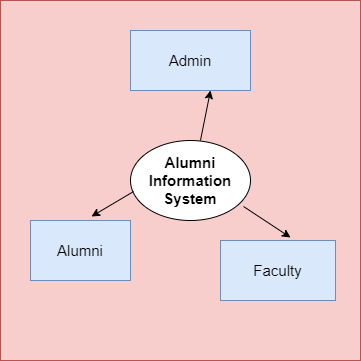
The Alumni Information System is a multi-role web application with three main types of users:
- Admin
- Alumni
- Faculty Members
The Admin has primary control over the system and is responsible for managing alumni, faculty members, events, and other system information.
Alumni and faculty members can register and log in to the system to manage their profiles, search for other members, view events, share images and videos, and communicate with other alumni and faculty members.
The complete project is developed using Java Servlet and JSP. The front end uses HTML, CSS, and Bootstrap, while JDBC API is used for database connectivity. The application uses MySQL as its database and follows the MVC (Model-View-Controller) design pattern.
Technologies Used
- Programming Language: Java
- Backend: Servlet and JSP
- Frontend: HTML, CSS, Bootstrap
- Database: MySQL
- Database Connectivity: JDBC
- Architecture: MVC Design Pattern
Alumni Information System Abstract
After graduating from college or university, students often lose contact with their classmates, batchmates, and faculty members as they move forward in their careers and personal lives. The Alumni Information System is designed to help re-establish and maintain these connections.
The primary goal of this project is to bridge the gap between alumni, their batchmates, faculty members, and educational institutions. It provides a centralised platform where former students can connect with their friends, discover what their batchmates are doing, participate in university events, and communicate with faculty members.
Users can register themselves and create their profiles to become part of the alumni network. They can then search for their old friends and batchmates, view profiles, communicate with other members, and stay updated about college or university events.
Codebun’s Alumni Information System in Java provides separate functionality for Admin, Alumni, and Faculty Members.
The Admin acts as the primary user of the application and manages the overall system. The Admin can maintain records of registered alumni and faculty members and manage information related to college or university events, functions, and other activities.
Faculty members can log in to the system, manage their profiles, search for alumni and other faculty members, and communicate with other users.
Similarly, Alumni members can log in, manage their profiles, search for their batchmates and faculty members, view upcoming events, share media, and communicate with other members.
Objectives of the Alumni Information System
The major objectives of the Alumni Information System are:
- To provide a reliable and user-friendly platform for alumni management.
- To build a secure and robust Alumni Information System.
- To bridge the communication gap between alumni, faculty members, and educational institutions.
- To maintain records of alumni and faculty members.
- To manage college and university events and activities.
- To provide a platform where alumni can reconnect with their batchmates and faculty members.
- To allow users to share images and videos with other members.
- To provide an easy way to search and communicate with alumni and faculty members.
Modules in Alumni Information System
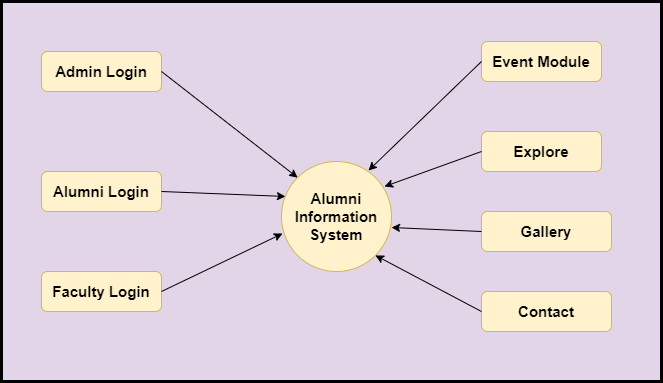
The Alumni Information System consists of several modules that provide different functionalities for Admin, Alumni, and Faculty Members.
Admin Login
The Admin Login module allows the administrator to securely log in to the system and manage the application’s overall functionality.
The Admin can manage alumni, faculty members, events, profiles, and other system-related information.
Alumni Login
The Alumni Login module allows registered alumni to log in to the system using their credentials.
After logging in, alumni can manage their profiles, search for batchmates and faculty members, view events, communicate with other users, and share images or videos.
Faculty Login
The Faculty Login module allows faculty members to securely access the system.
Faculty members can manage their profiles, search for alumni and other faculty members, view events, communicate with other users, and share media.
Event Module
The Event Module is used to manage college and university events, functions, alumni meetups, and other activities.
Users can view available events and stay updated about upcoming college or university activities.
Gallery Module
The Gallery Module allows users to share images and videos with other members of the alumni network.
This module helps users share memories and important moments from college or university activities.
Explore Module
The Explore Module allows users to search for their old friends, batchmates, alumni, and faculty members.
Users can search for other members and view their available profile information.
Contact Module
The Contact Module provides communication functionality between users. Alumni and faculty members can use this module to connect and communicate with other members of the system.
User Roles in Alumni Information System
There are three primary user roles in the Alumni Information System:
- Admin
- Alumni
- Faculty Members
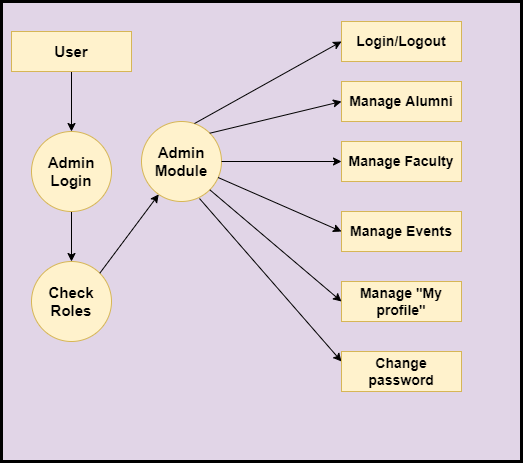
Admin
The Admin has complete control over the system and can perform the following operations:
- Log in and log out of the system.
- View, edit, and delete faculty members.
- View, edit, and delete alumni members.
- Manage college and university events and functions.
- Manage the Admin profile.
- Change the account password.
- Maintain alumni and faculty records.
Alumni
Alumni members can perform the following operations:
- Log in and log out of the system.
- Manage their profile.
- Search for other alumni using their names or available information.
- Search for faculty members.
- View college and university events.
- Communicate with other alumni members.
- Communicate with faculty members.
- Share images and videos.
- Change their account password.
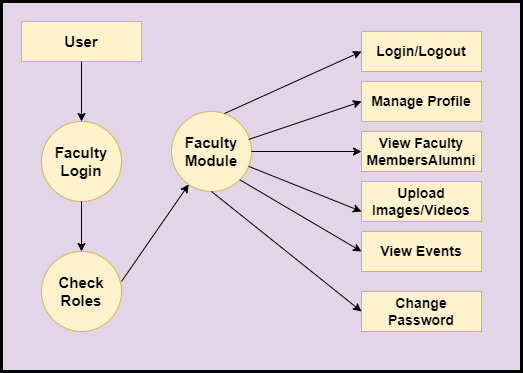
Faculty Members
Faculty members can perform the following operations:
- Log in and log out of the system.
- Manage their profile.
- Search for other faculty members and alumni.
- View college and university events.
- Communicate with alumni and other faculty members.
- Share images and videos.
- Change their account password.
Conclusion
The Alumni Information System in Java provides a centralized platform for educational institutions to manage their alumni network and maintain communication between alumni, faculty members, and the university.
By providing features such as alumni management, faculty management, event management, gallery, member search, and communication, the system makes it easier for former students and faculty members to stay connected even after graduation.
Project Demo
Flow Diagram for Alumni Information System

Tools and Technologies Used
Technology/Domain: Java
Front-End: JSP, Html, CSS, JS, Bootstrap.
Server-side: Servlet.
Back-end: MYSQL.
Server: Tomcat 8.5.
Get the Alumni Management System Source Code
If you want to download, explore, or customise the Alumni Management System project, you can access the source code from our GitHub repository.
The project is developed using Java, JSP, and Servlet and is intended for students and developers who want to understand how a Java web-based Alumni Management System works. The GitHub repository also includes the project files, database, and report.
👉 Get the Source Code: Alumni Management System – GitHub Repository
How to Configure a Java Web Project
If you are new to Java web application development, follow a step-by-step guide to learn how to configure and run a Java web project.
How to Configure a Java Web Project
Java Project Viva Questions and Answers
Preparing for your college project viva? Check these Java project viva questions and answers to prepare for common questions about your project, database, technologies, and architecture.
Java Project Viva Questions and Answers
More Java Projects with Source Code
Looking for more Java projects for your minor, major, or final-year project?
Explore More Java Projects with Source Code
Support Codebun ❤️
If you find this project or our tutorials useful, please subscribe/follow Codebun for more Java projects, programming tutorials, software testing, automation testing, and practical development resources.
Subscribe for free on YouTube: Codebun
Your support helps us continue creating free tutorials, project resources, and useful content for students and developers.
⭐ Get the source code • ❤️ Support Codebun • 📚 Keep Learning
